
Introduction
Over the last year or so, SAP has been working behind the scenes to upgrade various internal components of SAP Cloud Integration. First, the underlying Apache Camel framework was upgraded to 3.14.7 about a year ago. Subsequently, the Java runtime moved from version 8 to 17. Lastly in the past couple of months, we see the introduction of Groovy script step version v2.x which supports Groovy 4.0.x. In this post, I will cover tips on how to effectively upgrade to Groovy 4.0.x in SAP Cloud Integration (CPI) developments.
The approach begins with first upgrading the script step using the Web UI, then syncing the changes to a Git repository, lastly making necessary corrections in a local development environment.
The Version Multiverse
Now, in order to work effectively with this latest and greatest Groovy script step, we should first confirm the underlying component versions that are used in the Cloud Integration runtime.
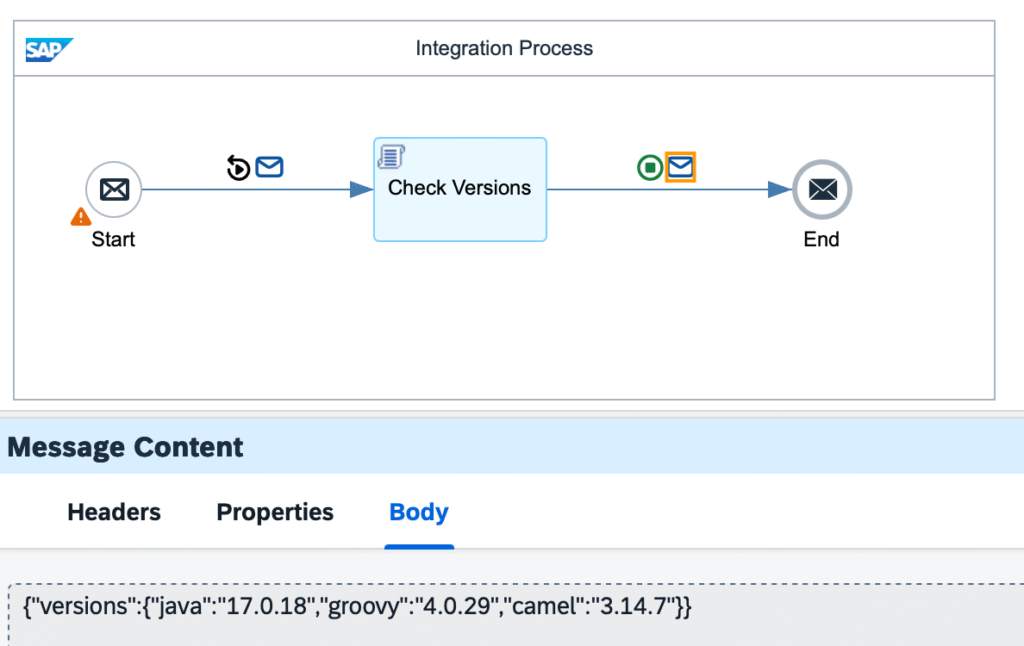
This can be done by running simulation of a Groovy v2.x script step with the following code.
import com.sap.it.script.v2.api.Message
import com.sap.it.script.v2.api.CamelContext
import com.sap.it.script.v2.api.Exchange
import groovy.json.JsonBuilder

def Message processData(Message message) {
    Exchange ex = message.exchange
    CamelContext ctx = ex.getContext()
    String camelVersion = ctx.getVersion().replaceAll(/(\d+.\d+.\d+)-.+/,'$1')

    def builder = new JsonBuilder()
    builder {
        versions {
            'java' System.getProperty('java.version')
            'groovy' GroovySystem.getVersion()
            'camel' camelVersion
        }
    }

    message.setBody(builder.toString())
    return message
}The output of the simulation would provide the versions of the 3 key components:
- Java – 17.0.18
- Groovy – 4.0.29
- Camel – 3.14.7
The Upgrade Awakens
With that information in place, we are ready to start the upgrade process. We will use an example from the flashpipe-demo repository, an Integration Flow that contains a Groovy script with XML transformation logic.
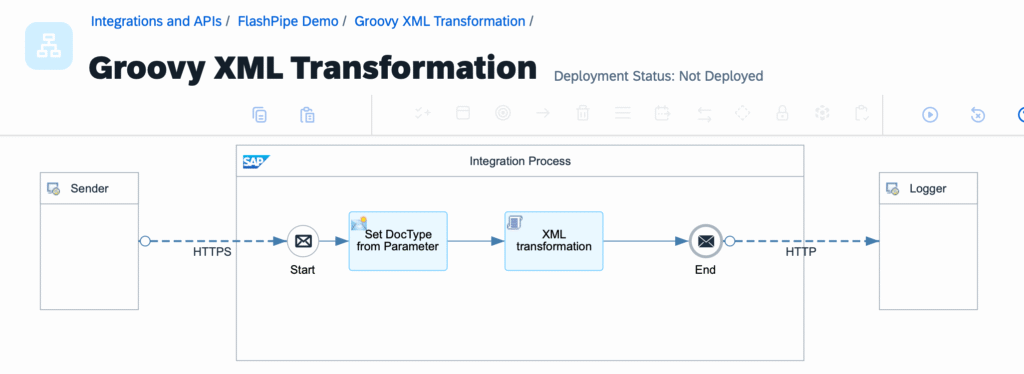
The process of upgrading the Groovy script step is executed first through the Web UI. The SAP Cloud Integration – Upgrade Readiness Design Guidelines/Best Practices for Future Readiness post provides further information on the upgrade process.
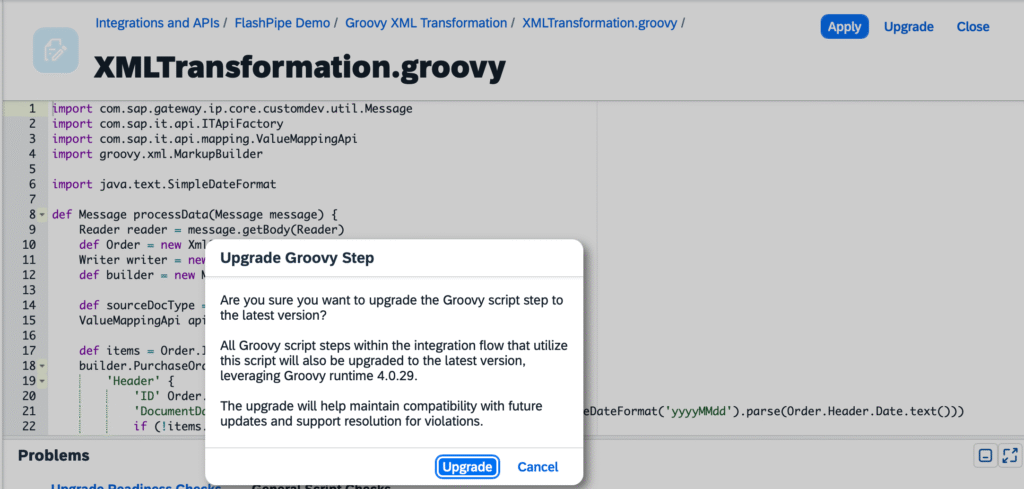
First of all, navigate to the Groovy script and hit the Upgrade button on the top left corner and proceed.
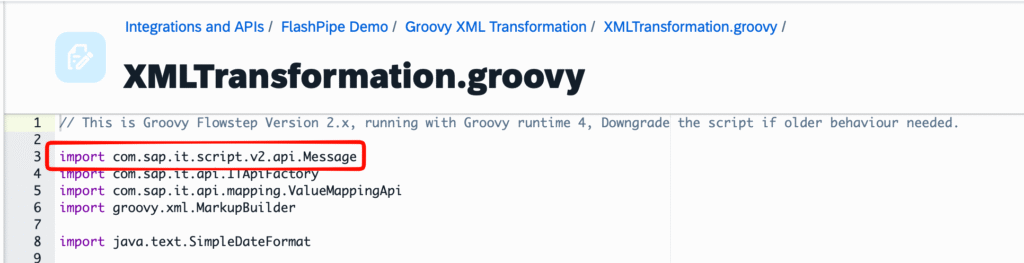
You will notice that the upgraded script now uses a different Message class – com.sap.it.script.v2.api.Message.
The upgrade process also retains the older v1.x version of the script which you can see in the References tab. Since the Integration Flow is already version managed in GitHub, we will go ahead and remove these older scripts.
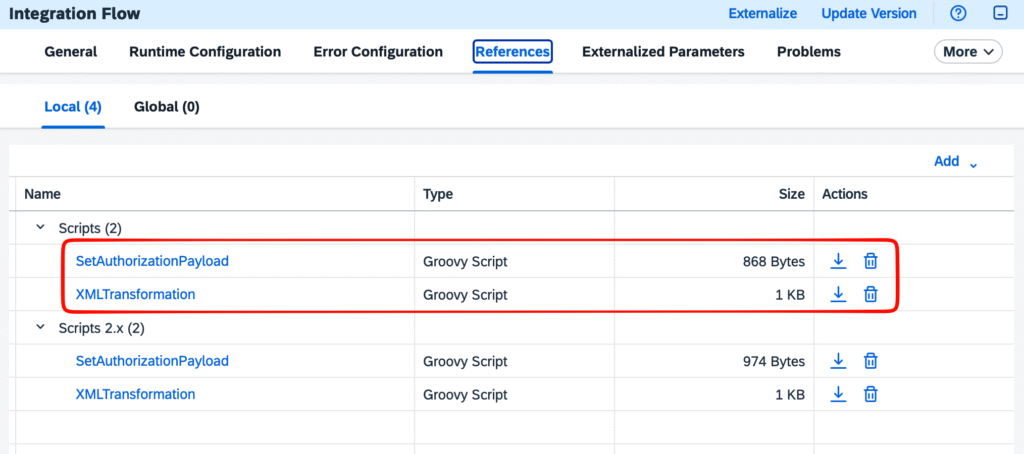
TIP 💡 When upgrading, my recommendation is to upgrade all scripts in the Integration Flow. This is to prevent any issues that may come up due to version differences when executing local testing of the scripts.
Once this is done, save the Integration Flow and sync the changes to the GitHub repository.
The IDE Strikes Back
Now we can switch to a local IDE to continue with the upgrade process. After 7 years, my preferred IDE for Groovy development is still IntelliJ IDEA – we will see why in a little while.
The GitHub repository is already using Maven to manage dependencies and support unit testing. Therefore, we will make some updates to the pom.xml file.
The various software components are updated to the versions that we confirmed earlier. As Spock is used for unit test, it is also updated to the corresponding version that supports Groovy 4.0.x.
<properties>
    <project.build.sourceEncoding>UTF-8</project.build.sourceEncoding>
    <jdk.version>17</jdk.version>
    <groovy.version>4.0.29</groovy.version>
    <log4j.version>2.22.1</log4j.version>
    <spock.version>2.4-groovy-4.0</spock.version>
    <camel.core.version>3.14.7</camel.core.version>
</properties>The Maven coordinates for the Groovy library have changed significantly and is no longer at org.codehaus.groovy:groovy-all. Instead it has now moved to org.apache.groovy, and split into various artifacts: groovy, groovy-json, groovy-xml, and more. For simplicity, we will just include the core and the commonly used XML and JSON libraries to begin with. These are updated in the /dependencyManagement/dependencies and /dependencies section of the POM below.
<dependencyManagement>
    <dependencies>
        <dependency>
            <groupId>org.apache.groovy</groupId>
            <artifactId>groovy</artifactId>
            <version>${groovy.version}</version>
        </dependency>
        <dependency>
            <groupId>org.apache.groovy</groupId>
            <artifactId>groovy-json</artifactId>
            <version>${groovy.version}</version>
        </dependency>
        <dependency>
            <groupId>org.apache.groovy</groupId>
            <artifactId>groovy-xml</artifactId>
            <version>${groovy.version}</version>
        </dependency>
        ....
    </dependencies>
</dependencyManagement><dependencies>
<dependency>
<groupId>org.apache.groovy</groupId>
<artifactId>groovy</artifactId>
</dependency>
<dependency>
<groupId>org.apache.groovy</groupId>
<artifactId>groovy-json</artifactId>
</dependency>
<dependency>
<groupId>org.apache.groovy</groupId>
<artifactId>groovy-xml</artifactId>
</dependency>
....
</dependencies>Additionally, we also need a copy of the new com.sap.it.script.v2.api.Message class that is capable of local runtime execution. For this, we use a mock implementation of the class, which is included in the sap-cpi-mocks library that I have previously introduced in Test Value Mapping in CPI Groovy Scripts. Update the following dependency to version 2.0.0 to include the class in the project.
<dependencies>
    ....
    <dependency>
        <groupId>com.equaliseit</groupId>
        <artifactId>sap-cpi-mocks</artifactId>
        <version>2.0.0</version>
    </dependency>
</dependencies>Now with the necessary libraries in place, after we perform a Sync Maven Changes to load the new libraries, we can start inspecting the Groovy script in the IDE.
Hey, where did my package go?
The first thing to do is to open the XMLTransformation.groovy script in the editor. Now this is where we see the beauty of the built-in support for Groovy in IntelliJ IDEA. Immediately we can see that there is a problem with XmlSlurper. The upgrade to Groovy 4.0.x introduced a breaking change – a change in the package, moving from groovy.util.XmlSlurper to groovy.xml.XmlSlurper. Since it has moved out of the groovy.util package (which is imported by default) it now requires an explicit import statement, which again could be done easily in the context help provided by IntelliJ IDEA.
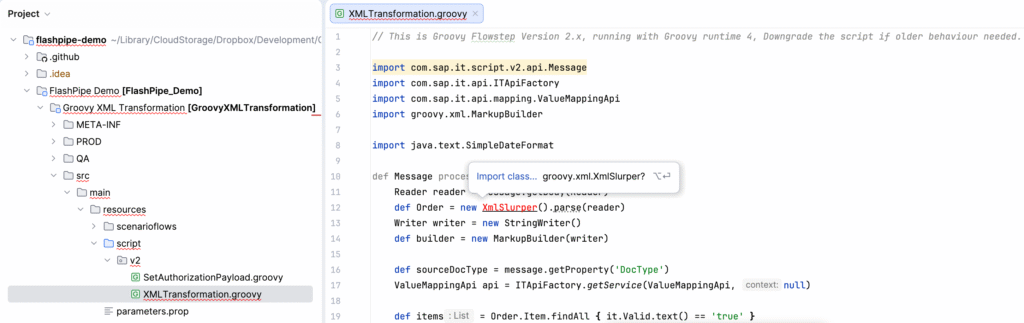
The corresponding Spock specification XMLTransformationSpec.groovy needs to be adjusted as well with the following
- Change in import of Message class
- Add import for XmlSlurper class
- Change location of script – now under /script/v2
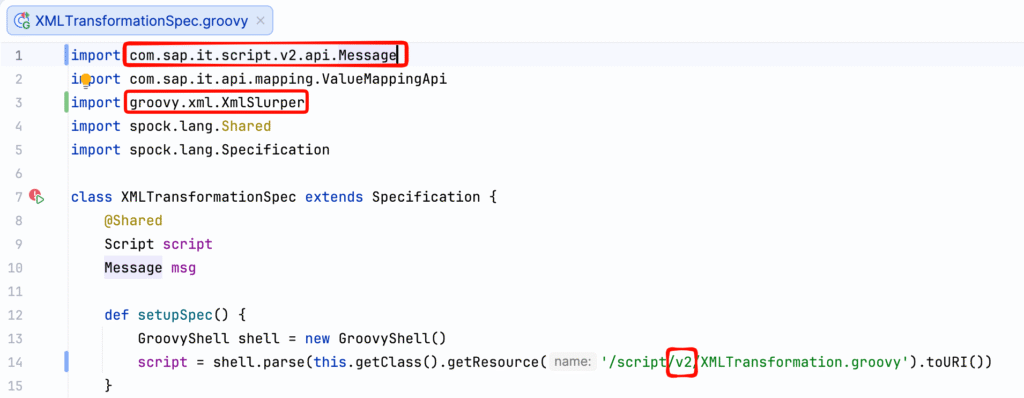
Example of other classes (non-exhaustive) that are similarly affected by the package restructuring are
- GPathResult 👉🏻 groovy.xml.slurpersupport.GPathResult
- XmlParser 👉🏻 groovy.xml.XmlParser

To Date or not to Date?
IntelliJ IDEA offers further productivity boost in other subtler ways. Methods that are deprecated/obsolete shows up with a strikethrough font. Furthermore, if you already have existing unit tests, these would fail if you tried to execute them locally.

One such class that is affected is the java.util.Date class. This is a pre-Java 8 class and is not recommended to be used due to various inconsistencies that it causes. If for whatever reason it ends up being used, it could cause a problem for the upgrade. Although Java 17 has deprecated/removed some of its methods, e.g. parse(), it still works in a Groovy v1.x step because Groovy 2.4.21 has JDK enhancements that support such methods. When upgrading to the Groovy v2.x step, the JDK enhancements in Groovy 4.0.29 no longer has these methods, therefore causing the failure.
Such logic should be refactored to use more appropriate classes from the java.time package such as java.time.LocalDate.
Conclusion
Overall, I have found that the upgrade to Groovy 4.0.x has not been too problematic. Based on the codebase that I regularly work with, which has a fair amount of complex logic, there have been only several unique issues that surfaced. These are to be expected as it is a major version upgrade after all.
If you are planning to make the upgrade yourself, the points that I have mentioned would be handy for your journey:
- Use a local development environment – IntelliJ IDEA is still my recommended IDE for Groovy
- Unit test scripts locally – you can verify your codebase and turn around any fixes a lot faster
- Start slow and go small – try upgrading all scripts in one integration to familiarise yourself first before going all in
Happy upgrading 🚀🚀🚀
References
The following links provide the full repository for the source code used in the post.
- FlashPipe Demo project repository (github-actions branch) with example of changes to upgrade to Groovy 4.0.x
- Source code repository with CPI mock implementation of new Message class
Comments
Feel free to provide your comment, feedback and/or opinion here.